Allowing the server address in MetaTrader
MetaTrader does not let a program talk to the internet without your explicit permission. That is a protection of its own, and it is good that it exists.
Where it is: MetaTrader → Tools → Options → Expert Advisors.
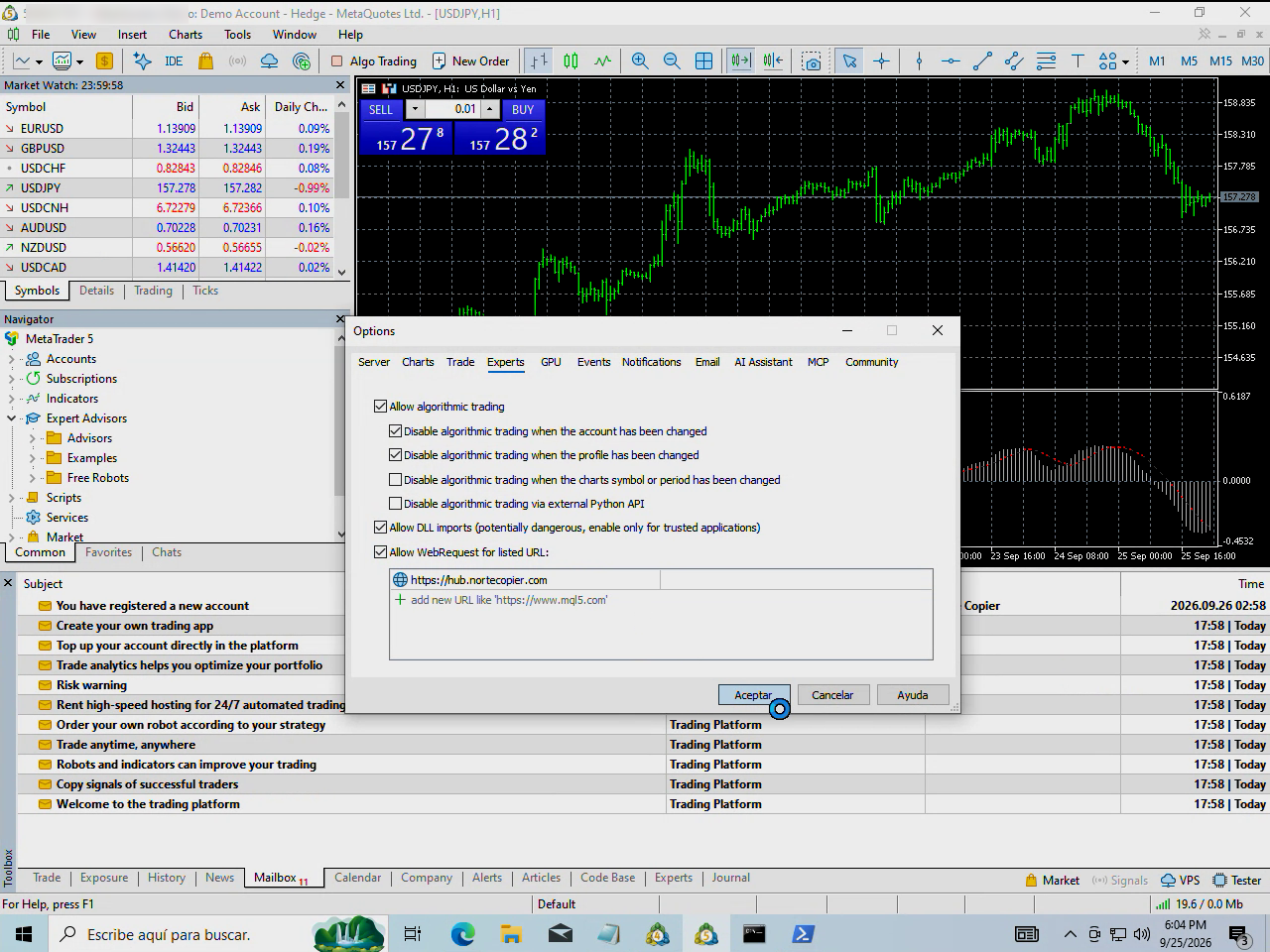
How to do it
- In MetaTrader (5 or 4, same thing), menu Tools → Options.
- The Expert Advisors tab.
- Tick Allow WebRequest for listed URL.
- Click into the list and type this address, exactly like this:
https://hub.nortecopier.com
No trailing slash, no spaces, with https.
- Accept, then remove and re-add the program to the chart.
Why the address has to be exact
MetaTrader compares the address letter by letter. One extra space, one missing letter, or http instead of https, and it does not recognise it — and the program will keep saying it cannot connect.
Copy it from here or from the bot and paste it; do not type it by hand.
How to tell it worked
The program stops warning on the chart and, within seconds, the terminal shows as connected in the bot's app.
If it still will not connect, see The terminal shows as disconnected.
This is all that is allowed
That checkbox gives no access to your account or your funds: it only authorises that program to talk to that one address. Your MetaTrader password is not involved at any point.
Still stuck?
Write to us in the bot and a person reads it. Tell us what you expected and what happened.
Write in Telegram